.png?width=250&height=79&name=foundryzcashpool_logo_inverse%20(2).png)
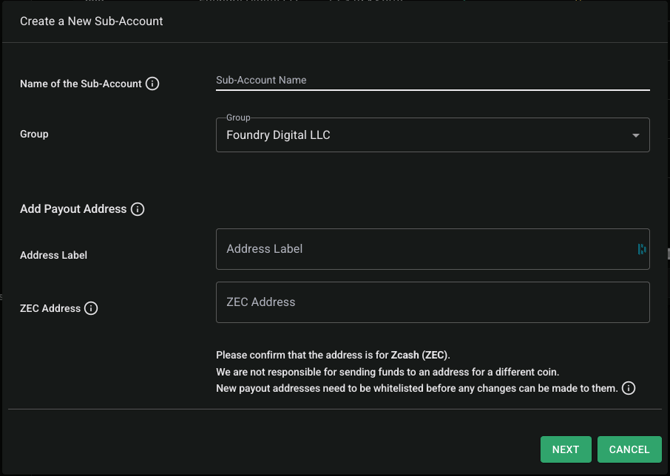
Only users with the "owner" user role may create a sub-account on the Foundry Zcash Pool. A sub-account name, payout address and payout address label are required in order to create a new sub-account.
Steps to create a new sub-account:
- Navigate to the "Sub-Accounts" menu on the left-hand side
- Press" + New-Subaccount" and enter in the following details:
- Name of the sub-account
- Payout address label/name
- ZEC Address (only t-addresses are currently accepted)
- You may connect your miners to your new sub-account immediately to begin earning your ZEC rewards.
- As a reminder, all new payout addresses are whitelisted by our finance and compliance teams and will not pay rewards until approved
- In general, our whitelisting approval process takes 48 business hours from submission to approval.
- Reusing an existing, whitelisted ZEC address from another sub-account will payout your ZEC rewards to the address during our next earnings window, provided the total earnings from all sub-accounts using that address are > 1 ZEC.